
Cables and tracing
On this page
Besides patching in the rack editor, you can connect cables from the device page, connect whole ranges at once, and follow any cable from one end to the other.
Connecting a cable from the device page#
- On the device page, click a free port and then Connect cable.
- 1. Choose the other device: type in Filter by ID, path, name…. Devices in the same rack and room are listed first, with the number of free ports.
- 2. Choose the port: ports in use are greyed out.
- 3. Cable details: Cable label (empty = automatic, e.g. C-0042), Type, Colour, Length (m) and Notes.
- Click Connect.
To change a cable, open one of its ports and click Edit cable. To remove it, click Disconnect.
Bulk connect: a range of ports in one go#
Connects a range one-to-one, for example patch panel ports 01–24 to switch ports 01–24.
- Click Bulk connect on the device page, or Tools → Bulk connect… in the rack editor.
- Choose the Start port on this device and the Number of connections.
- Choose the Target device and its Start port on target.
- Set the Cable type, Colour and Length (m) (Cat6, yellow, 0.5 m by default).
- Check the preview and click Connect all.
Each range stays on the side (front or rear) of its start port. If a port in the range is taken, the preview says why it cannot connect.
Tracing a cable end to end#
Open a trace with the trace icon in the device's Port list, Trace in the port dialog, Full trace in the rack editor, or a cable from the search results.
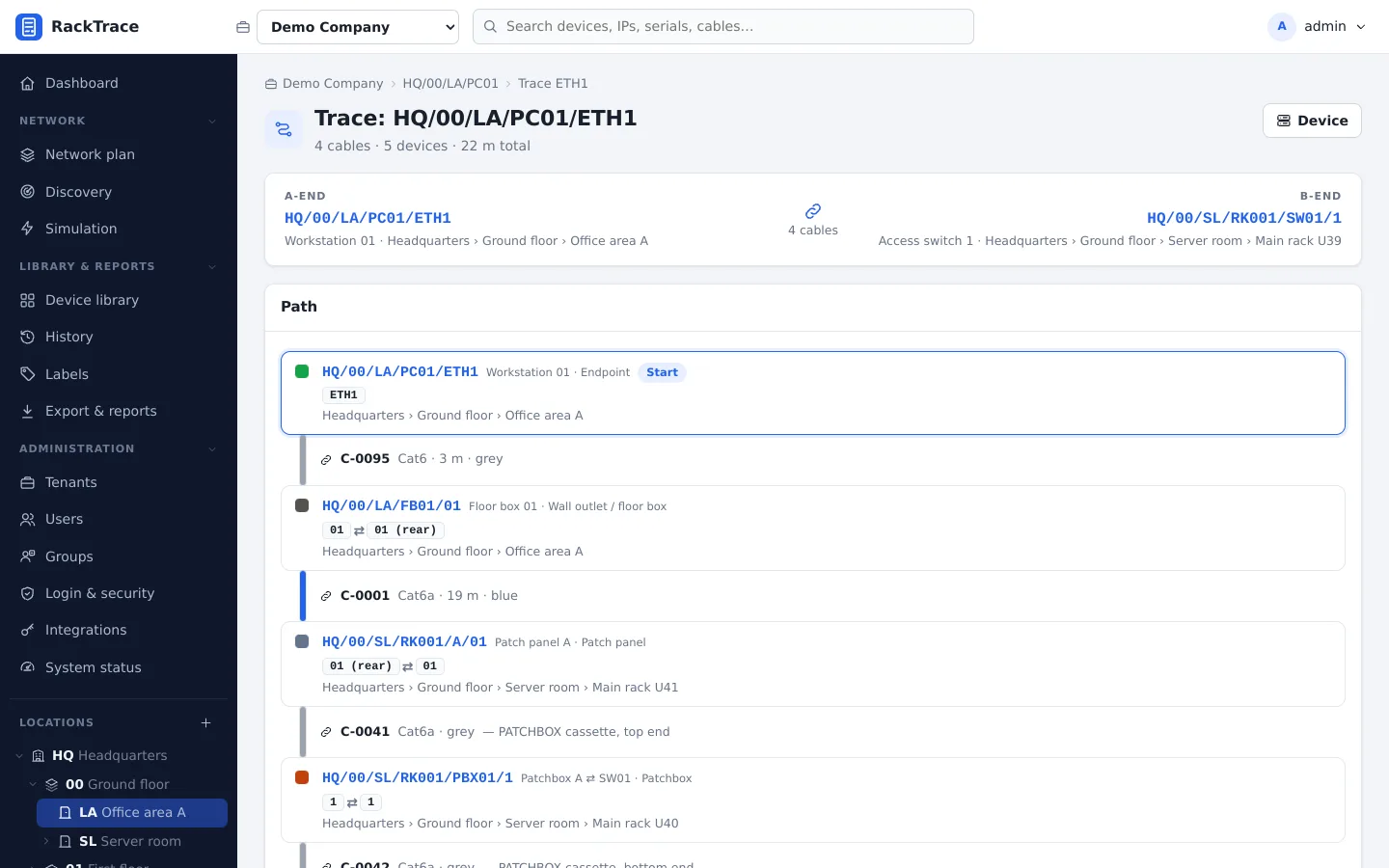
- The title shows the port, with the number of cables and devices on the way and the total length of the cables with a documented length.
- A-end and B-end show both ends, with device and location.
- Path lists every device on the way. Ports joined inside a device, such as a patch panel's front and rear, show as
01 ⇄ 01 (rear). Between the devices you see each cable in its colour, with label, type and length. - If the path loops back on itself, a warning says This path contains a loop — check the cabling.
Example of a trace chain: HQ/00/LA/PC01/ETH1 → HQ/00/LA/FB01/01 → HQ/00/SL/RK001/A/01 → HQ/00/SL/RK001/SW01/01.