
NetBox
On this page
Moving from NetBox? Bring its documentation over in one step: sites, locations, racks, devices with their interfaces, console and power ports, patch panels with their front and rear ports, and the cables between them. RackTrace reads NetBox 3.x and 4.x — through the NetBox API, or from files exported from NetBox when RackTrace cannot reach it. You see a preview first and choose the sites and the tenant they go into.
What comes over#
| NetBox | RackTrace |
|---|---|
| Site | Site, with its physical address and description. A site of the same name in the tenant is used. |
| Location with racks or devices of its own, or without locations below it | Room |
| The location above that room | Floor — "Floor 2" becomes floor 02, "Level -1" floor -1 |
| Locations higher up (a building, a campus) | The Building of the room |
| No location | Room "Main room" on floor 00 "Ground floor" |
| Rack | Rack with its height (at most 60U), asset tag and facility ID. Racks that count their units from the top, or start at another unit, are converted. |
| Device | Device in its rack at its U, or in its room. Name, status, serial number, asset tag, primary IP, description and comments. |
| Device type | The template of the device library of the same manufacturer and model (or part number); otherwise a generic template of its kind and height, such as Server 1U or Switch 48x GbE. See Device types and ports. |
| Device role | Category (switch, patch panel, server, PDU …) |
| Interface | Port with its type (RJ45, SFP+ …), speed, PoE, label and description; switched off and link aggregation (LAG) as in NetBox; management only becomes the role Management |
| Console port, console server port | Port (Console, DB9, USB) |
| Power port, power outlet | Port (Power C14, C13, Schuko …) |
| Front port with its own rear port | A pass-through pair, as on a patch panel: a trace runs through it |
| Cable | Cable between the two ports, with its label, type, colour, length (converted to metres) and planned when it is planned in NetBox |
A port name with / gets - instead (Gi1/0/1 becomes Gi1-0-1), as everywhere in RackTrace.
What does not come over#
- Virtual, wireless and LAG interfaces themselves (a LAG's members do come, with the LAG's name), VLANs, prefixes and IP addresses (only a device's primary IP), VRFs.
- Circuits and power feeds, and the cables to them. Cables to devices of sites you do not import.
- Modules and module bays, device bays: a device in a device bay (a blade) goes into the room, with a note where it was.
- Virtual machines, clusters, contacts, tags, custom fields, journal entries, images.
- A front port that shares a rear port with other front ports (an MPO cassette: one rear port with 12 positions) comes over without the internal link — the preview says which.
A device on a U that is already taken, or above the top of the rack, goes into the room of its rack, with a note in its notes. The preview lists all of these.
From the NetBox API#
- In NetBox, make an API token. NetBox 4: Admin → API Tokens → Add (or your user menu → API Tokens); NetBox 3: your user menu → API Tokens. Reading is enough: leave Write enabled off.
- In RackTrace, open Export & reports in the tenant you want to import into (as an administrator) and click Import from NetBox.
- Choose NetBox API, fill in the NetBox address — the address you open NetBox with, such as
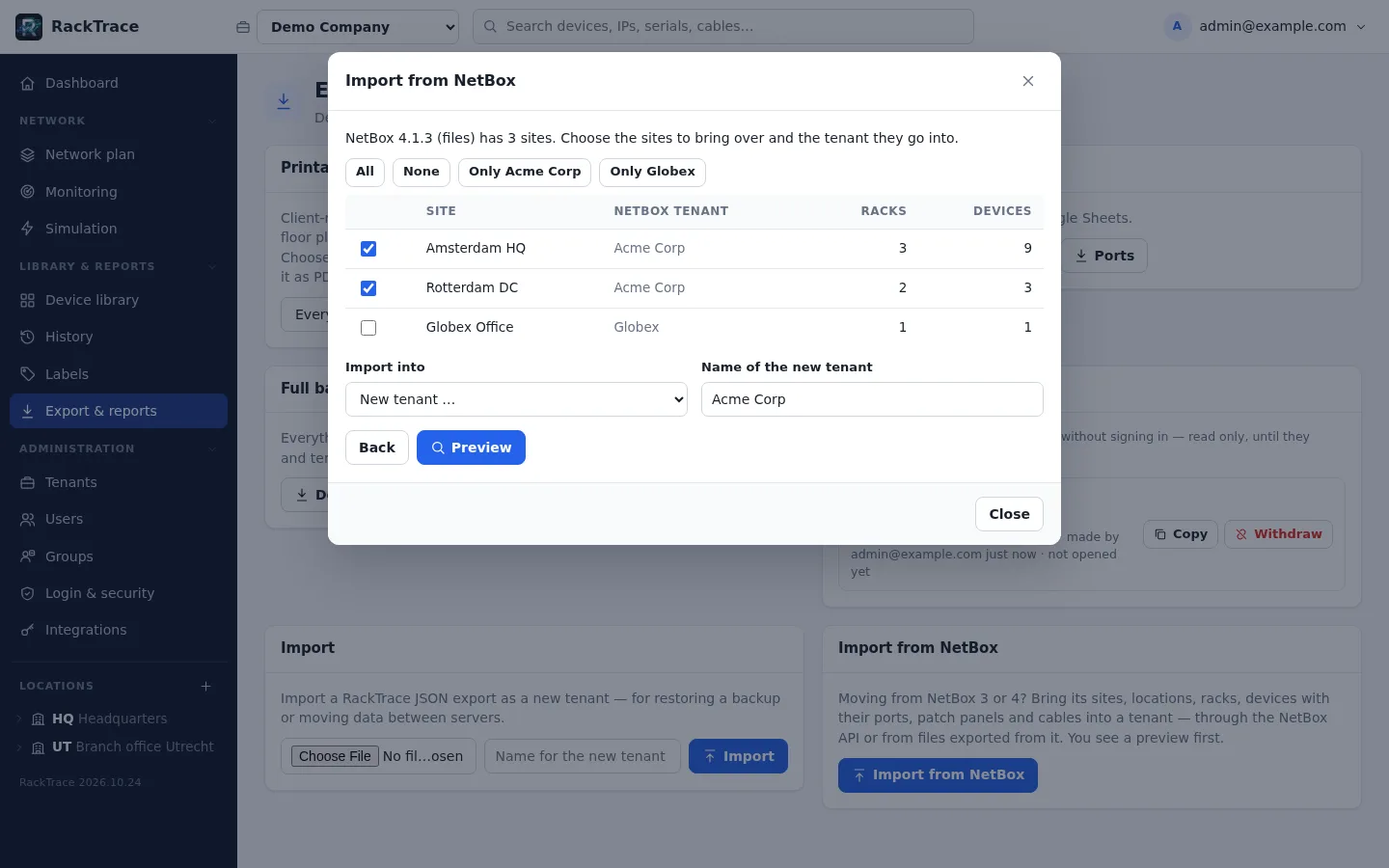
https://netbox.example.com— and paste the API token. Click Next. - Choose the sites. Every site shows its NetBox tenant, so Only … picks the sites of one customer.
- Under Import into, choose a tenant, or New tenant … with a name (the name of the NetBox tenant when the sites have one).
- Click Preview, check it (see The preview) and click Import.
The token is used for this import only: RackTrace does not store it, and it is not in the history. RackTrace reads NetBox itself, page by page — a large NetBox takes a while.
Can RackTrace reach your NetBox?
On racktrace.io, RackTrace reads NetBox over the internet: the address must use https and be reachable from the internet. RackTrace never connects to an internal address (10.x, 192.168.x, localhost …) and does not follow redirects. Is your NetBox only reachable inside your network? Use files instead. On your own RackTrace server (one organization) an internal address works too, and NETBOX_ALLOW_HTTP=1 allows http://.
From files#
For a NetBox that RackTrace cannot reach, export its lists as JSON and choose Files in the dialog. RackTrace reads one file per list of the NetBox API, or one file with all lists; which list a file holds, it sees from its content.
From the browser, signed in to NetBox: open each of these addresses and save the page (Ctrl+S) as a .json file:
https://netbox.example.com/api/dcim/sites/?limit=0&format=json
https://netbox.example.com/api/dcim/locations/?limit=0&format=json
https://netbox.example.com/api/dcim/racks/?limit=0&format=json
https://netbox.example.com/api/dcim/device-types/?limit=0&format=json
https://netbox.example.com/api/dcim/devices/?limit=0&format=json&exclude=config_context
https://netbox.example.com/api/dcim/interfaces/?limit=0&format=json
https://netbox.example.com/api/dcim/front-ports/?limit=0&format=json
https://netbox.example.com/api/dcim/rear-ports/?limit=0&format=json
https://netbox.example.com/api/dcim/console-ports/?limit=0&format=json
https://netbox.example.com/api/dcim/console-server-ports/?limit=0&format=json
https://netbox.example.com/api/dcim/power-ports/?limit=0&format=json
https://netbox.example.com/api/dcim/power-outlets/?limit=0&format=json
https://netbox.example.com/api/dcim/cables/?limit=0&format=json
NetBox gives at most 1000 objects per page (its MAX_PAGE_SIZE). When a list has more — the interfaces, often — save the next pages too with &offset=1000, &offset=2000 …; RackTrace puts the pages of a list together. Add &site=<slug> to export one site.
With a script, for a large NetBox: this script (Python 3, nothing to install — every NetBox server has it) writes all lists into one file, netbox-export.json:
#!/usr/bin/env python3
"""Writes the NetBox lists RackTrace imports into one file, netbox-export.json.
    python3 netbox-export.py https://netbox.example.com <API token> [site slug ...]
Without site slugs: every site. A self-signed certificate: NETBOX_INSECURE=1 python3 netbox-export.py ..."""
import json, os, ssl, sys, urllib.parse, urllib.request

base, token, sites = sys.argv[1].rstrip('/'), sys.argv[2], sys.argv[3:]
auth = ('Bearer ' if token.startswith('nbt_') else 'Token ') + token
tls = ssl._create_unverified_context() if os.environ.get('NETBOX_INSECURE') else None

def get(path, params=()):
    req = urllib.request.Request(f'{base}/api/{path}/?{urllib.parse.urlencode(list(params))}', headers={'Authorization': auth, 'Accept': 'application/json'})
    with urllib.request.urlopen(req, context=tls) as r:
        return json.load(r)

data = {'netbox-version': get('status')['netbox-version']}
for name in ['sites', 'locations', 'racks', 'device-types', 'devices', 'interfaces', 'front-ports', 'rear-ports',
             'console-ports', 'console-server-ports', 'power-ports', 'power-outlets', 'cables']:
    params = [('slug' if name == 'sites' else 'site', s) for s in sites] if name != 'device-types' else []
    if name == 'devices':
        params.append(('exclude', 'config_context'))
    rows, offset = [], 0
    while True:
        page = get(f'dcim/{name}', params + [('limit', 1000), ('offset', offset)])
        rows += page['results']
        offset += len(page['results'])
        if not page.get('next') or not page['results']:
            break
    data[name] = rows
    print(f'{name}: {len(rows)}', file=sys.stderr)
with open('netbox-export.json', 'w') as f:
    json.dump(data, f)
print('Written: netbox-export.json — import it in RackTrace under Export & reports → Import from NetBox → Files', file=sys.stderr)
Save it as netbox-export.py and run it with the address and a token, for example python3 netbox-export.py https://netbox.example.com 0123abcd… ams-hq rtm-dc for two sites. The files together may be 40 MB at most; import a large NetBox a few sites at a time.
The preview#
The preview shows what the import does, before anything is made:
- How many sites, floors, rooms, racks, devices, ports and cables — new, and existing ones that are used.
- Not imported: virtual interfaces, cables to circuits and power feeds, cables to devices of sites you did not choose.
- Device types: the ones that are not in the library, with the generic template each gets (or none — own ports only), and the ones found in the library.
- To check: a device on a U that is taken or above the rack, a rack higher than 60U, a device in a device bay, front ports that share a rear port, a cable with several ends on one side that do not pair up, a device that already exists.
Import is not possible when the import would go over the limits of your plan (racks, devices or tenants) or when a new tenant's name is taken.
Importing#
- Only administrators import, as with the JSON import of a tenant.
- The import is one step: all of it or, when something goes wrong, nothing.
- Every site, floor, room, rack, device and cable gets its own entry in the history, as when made by hand; one more on the tenant says what came from which NetBox (version and address).
- Again into the same tenant: sites, floors, rooms and racks of the same name are used, and a device that already exists — the same name in its room, or the same serial number — is left as it is. Cables to it are connected where its ports are free; cables that are already there are skipped. So you can import one site after the other, or run the import again after NetBox changed — it adds what is new and changes nothing that exists.
- The plan of your organization limits the number of racks, devices and tenants; the preview says when the import would go over it.
Device types and ports#
A device type is matched to a template of the library by its manufacturer and its model or part number — "C9300-48P", "USW-Pro-48" — and the manufacturer may be written differently (Cisco Systems, HPE / Aruba, APC by Schneider Electric). A template of the tenant itself comes first. The device then has the template's ports with their real layout on the faceplate, and each NetBox port is matched to one of them: by its name (GigabitEthernet1/0/1 is Gi1-0-1), by its numbers (Port 1 is 1), or what is left of one port type in order. Ports NetBox has that the template does not are added.
A device type that is not in the library gets a generic template of its kind and height, for its look in the rack — Patch Panel 24x RJ45 Cat6, Fiber Panel 12x LC Duplex, Server 2U, PDU 0U 24x C13 — and its own ports exactly as NetBox has them, with the manufacturer and model of NetBox. When there is no generic template of that kind and height (a 7U blade chassis), the device has no template and only its own ports. To get the look right later, choose a template on the device page; or add the model to the library before the import, so the import finds it.